
# Module Protect
# Let's Take a Look at This Case
We have used the createLocalStorage API to create a storage module whose key content is "unprotected_storage_key":
// storage.ts
import { createLocalStorage } from '@soft-storage/vue-hooks';

type UnprotectedStorage = {
  str: string;
  num?: number;
};

export const storage = createLocalStorage<UnprotectedStorage>({
  storageModuleKey: 'unprotected_storage_key',
  initial: { str: '' },
});
We can then see our storage module in chrome's developer tool:
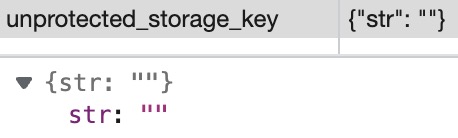
And then, someone writes code that looks like this:
window.localStorage.setItem('unprotected_storage_key', 'foo');
However, we all know that once this line of code is executed, the data structure of the storage module will be destroyed:

And once the storage module is destroyed, Soft Storage will not work normally!!!
# How to Solve?
To prevent the data structure of the storage module from being corrupted, Soft Storage provides a configuration item that prevents the storage API from making the original call to the storage module key:
// storage.ts
import { createLocalStorage } from '@soft-storage/vue-hooks';

type ProtectedStorage = {
  str: string;
  num?: number;
};

export const storage = createLocalStorage<ProtectedStorage>({
  storageModuleKey: 'protected_storage_key',
  protect: true, // Just need set it to true
  initial: { str: '' },
});
After opening the module protection like this, the three apis setItem(), removeItem() and clear() will be overridden by Proxy (let's say we're using localStorage):
When calling
localStorage.setItem('protected_storage_key', 'foo'), you will receive an error like this:
When calling
localStorage.removeItem('protected_storage_key'), you will receive an error like this:
When calling
localStorage.clear(), "protected_storage_key" and its corresponding value will be kept, the others will be deleted.
TIP
setItem(), removeItem() will only be blocked with an error if you try to change the key that belongs to a protected module (such as "protected_storage_key" above), and will work properly if you change other keys.